
 Deutsch
 English
Few questions are debated as passionately in hardware-driven gaming communities as this one: do you build your next gaming PC yourself, or do you buy a finished system? In early 2026, this decision has become more complicated than it was just a few years ago. RAM and SSDs have gotten noticeably more expensive, graphics cards are under price pressure due to high demand from the AI sector, and supply chains are no longer as predictable as they used to be. At the same time, modern components have become more technically demanding – from PCIe generations to XMP/EXPO profiles to BIOS compatibility lists.
We don't want this to be an advertisement for buying pre-built. Building your own PC has real advantages, and we're not going to downplay them. This page is meant as an objective decision-making guide – with honest numbers, real risks, and a step-by-step guide to help you figure out which path fits you.
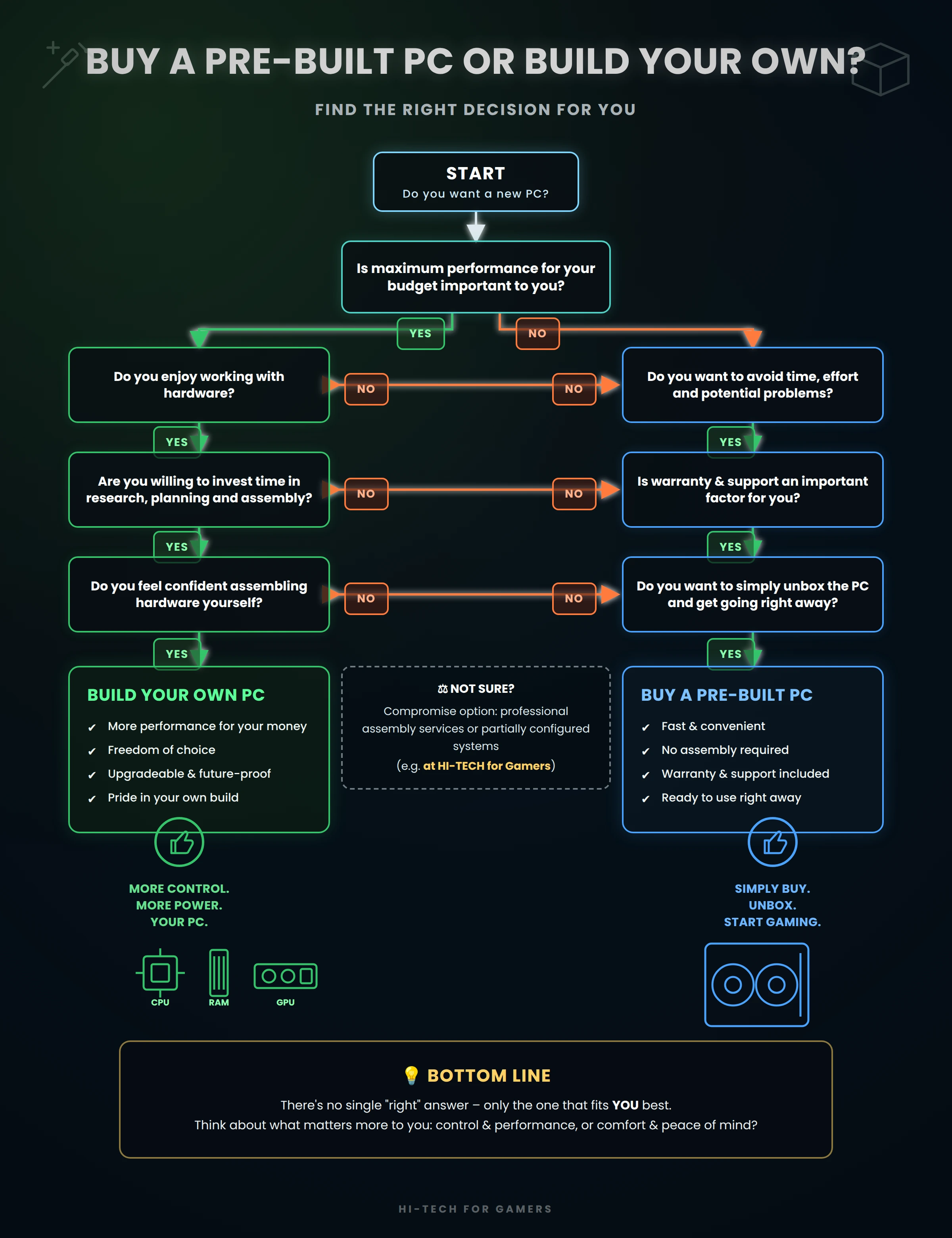
The three paths to your new gaming PC
The discussion is usually reduced to two options. In reality, there are three:
- Custom build – You choose every single component yourself, order them separately, and assemble the PC with your own hands.
- Pre-built PC with stress-test logs – A complete system from a provider like HI-TECH for Gamers.
- Custom configuration – You put together your dream PC with a specialized system builder (like we have been for 40 years) (e.g. via our custom PC configuration or as an upgrade PC with your own graphics card), where compatibility is checked in advance and assembly plus stress testing is handled by a professional.
This third option is completely left out of most "build vs. buy" comparisons online, even though for many gamers it's actually the sweet spot in between. That's why we deliberately include it here.
The right decision in 5 steps:
Step 1: Honestly assess your time, knowledge and enthusiasm for tinkering
The most underestimated factor when building your own PC is time. Realistically, this adds up:
- Researching compatible components (motherboard chipset, RAM compatibility list, PSU connectors, case size vs. GPU length)
- Ordering from multiple retailers and waiting for deliveries
- The actual assembly (easily 4–8 hours for your first build)
- BIOS setup, enabling XMP/EXPO profiles, Windows and driver installation
- Troubleshooting if the PC doesn't boot on the first try – a common scenario that can cost a lot of time without experience
Advantages of building your own: You get to know your system from the ground up, have full control over every single decision, and many people take real pride in a PC they built themselves.
Disadvantages of building your own: The time investment is almost always underestimated. Mistakes during assembly (ESD damage to components, RAM modules not seated correctly, unconnected CPU power cables) are far from rare, especially on a first build. If something goes wrong, there's no single point of contact – CPU, motherboard and RAM manufacturers are often happy to point the finger at each other.
Pre-built PC and custom configuration: This entire process is skipped. The system arrives assembled, set up and tested – including, for a custom configuration, the components you chose.
Step 2: A realistic comparison of the actual 2026 costs
The common assumption that "building your own is cheaper" only holds true to a limited extent in 2026. Three reasons why:
- RAM prices have risen sharply. Around the turn of 2025/2026, DDR5 memory prices increased noticeably (see our current RAM prices in the inflation report). If you don't factor this price development into your own budget, building your own PC can bring an unpleasant surprise.
- System manufacturers buy at scale. Anyone ordering components for hundreds of systems at once gets different terms than a single buyer in retail. This often shrinks the price advantage of building your own to just a few percent – or even reverses it during promotional pricing.
- Hidden extra costs are easily forgotten: a Windows license (at HI-TECH for Gamers, the current Windows version is already included in the price), a CPU cooler (not included with many high-end CPUs), thermal paste, cable management accessories, and potentially multiple shipping costs if parts are ordered from different retailers.
For a realistic overview of current CPU and GPU prices, take a look at our GPU & CPU recommendations – there you can see how the price difference between individual components and a complete system plays out in practice.
Step 3: Weighing warranty, support & risk
This is the point that gets left out most often online.
When you build your own PC, you have a warranty on every individual component – but no warranty on the finished system actually working together. If the PC doesn't boot after assembly, troubleshooting by process of elimination begins: is it the power supply, the motherboard, the RAM, or just a loose connection? Every suspect part has to be individually claimed and shipped back to its respective retailer – a process that can drag on for weeks.
With a pre-built PC or a custom configuration, you get a warranty on the whole system, with a single point of contact. Reputable system builders – including HI-TECH – stress-test every system for several hours under full load before shipping, to catch exactly these kinds of issues before delivery instead of after.
To be fair, though: experienced builders with their own troubleshooting know-how sometimes see full control over the RMA process as an advantage, since they're not dependent on a system builder's response time.
Step 4: Decide how much customization you want
| Criterion | Custom build | Off-the-shelf pre-built PC | Custom configuration |
|---|---|---|---|
| Component choice | 100% free | none to minimal | CPU, GPU, RAM, cooling, case customizable |
| Compatibility check | up to you | not applicable (fixed spec) | handled by the system builder |
| Reuse your own hardware | yes, without restriction | usually not possible | partially possible (e.g. send in your own graphics card) |
On that last point: this is exactly what two concrete HI-TECH models are built for, showing that custom configuration isn't just a marketing phrase but a real, practical option:
- Buy a PC in your desired configuration – every PC is built to order, and individual requests are reviewed and implemented by the sales team.
- Buy a PC without a graphics card – send in your existing GPU, or have the PC prepared for you to install it yourself, while the rest of the system is new and tested.
Step 5: Conclusion – which path fits you?
In short: which path fits you?
- Building your own is worth it if you have the time and enthusiasm for tinkering, already know your way around the technical side or want to learn it, and are willing to troubleshoot problems yourself.
- A pre-built PC is worth it if time and peace of mind matter more to you than the tinkering process, and one of the standard configurations already fits what you need.
- A custom configuration is worth it if you have your own ideas but want neither the time risk of building your own nor the limitations of a rigid pre-built PC.
Note: Configure your PC according to the requirements table to ensure the stated performance.
Direct comparison at a glance
| Criterion | Custom build | Pre-built (off-the-shelf) | Custom configuration |
|---|---|---|---|
| Time investment | high (research + assembly) | none | none |
| Purchase cost | somewhat lower depending on know-how, hidden extra costs possible | usually the cheapest, but little flexibility | comparable to a pre-built PC, more targeted thanks to customization |
| Warranty | per component only | on the whole system | on the whole system |
| Stress test before delivery | no (up to you) | multi-hour, done by us | yes, multiple hours or multiple days |
| Customization | 100% | none to minimal | high |
| Troubleshooting if problems occur | your own responsibility | one point of contact | one point of contact |
| Ideal for | experienced builders with time | casual buyers with no special requirements | anyone with clear requirements who wants no build risk |
Frequently asked questions about building vs. buying a PC
Answer: Not across the board anymore. Due to rising RAM prices and the purchasing advantage system manufacturers get from large volumes, the price difference is often small – and can even flip in favor of pre-built during promotional deals.
Answer: Every component has its own manufacturer warranty, but there's no warranty on how well all the parts work together. If something breaks, you have to figure out yourself which component is affected.
Answer: Generally yes, as long as the components are technically compatible. For special requests (e.g. your own case), it's worth reaching out directly to the sales team.
Answer: For beginners, 4 to 8 hours for the assembly itself is realistic, plus research and setup time. Experienced builders are noticeably faster.
Answer: That's possible both when building your own and with a custom configuration. At HI-TECH, there's a dedicated option for this – "Buy a PC without a graphics card" – where your existing GPU is either sent in or the PC is prepared for you to install it yourself.
Answer: At HI-TECH, every system goes through a multi-hour stress test before delivery (6 to 24 hours depending on the system) to ensure stability.
Want your own custom gaming PC – without the risk of building it yourself?
Then take a look at which models you can configure individually at HI-TECH, or contact our sales team directly with your requirements.
Have questions? Contact us: