
 Deutsch
 English
Sim racing takes more than just a wheel
A good sim racing setup isn't just a wheelbase, a steering wheel and pedals. Your gaming PC decides how smoothly your simulation runs, which resolution is possible and how much headroom you have for ultrawide, triple screen, VR or streaming. A single Full HD setup needs a different performance class than three monitors, high refresh rates or a VR headset.
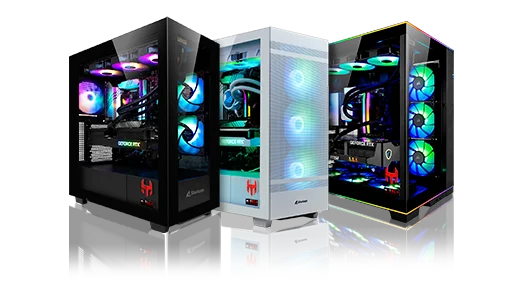
Modern racing simulations show exactly why the PC is a central part of the setup. For its recommended settings at 1080p, Le Mans Ultimate already lists an Intel Core i5-10600 or AMD Ryzen 5 5600X, 16 GB RAM and a GeForce RTX 2070 8 GB or Radeon RX 6600 8 GB. iRacing's official system requirements also distinguish between Minimum, Recommended and High End, listing 32 GB RAM or more for high-end systems. RaceRoom Racing Experience recommends 16 GB RAM and 8 GB VRAM on Steam, while Assetto Corsa Competizione, as the official GT World Challenge game, is especially interesting for GT racing.
That's why a sim racing PC shouldn't be planned just barely above the minimum requirements. If you race regularly, compete online or want to move to WQHD, ultrawide, triple screen or VR later, you'll benefit from performance headroom. Stable FPS, short loading times and clean frametimes make a big difference when you want to hit braking points reliably and judge how your car reacts.
A sim racing PC is the technical foundation of your racing experience. The wheel tells you what the car is doing. The PC makes sure you experience it smoothly, consistently and without unnecessary compromises.
Which sim racing PC fits your setup?
The right level of PC performance depends heavily on how you race. A single monitor is much easier to drive than a triple-screen rig or VR. The game matters too: iRacing, Assetto Corsa Competizione, Le Mans Ultimate, RaceRoom and F1 each put different demands on graphics, physics, online racing and hardware load.
| Situation | Recommendation | Matching HI-TECH PC |
|---|---|---|
| You're starting out with a single monitor in Full HD | solid gaming PC with a good mid-range graphics card | REDLINE (with headroom to grow) |
| You race in WQHD or at high refresh rates | plan for a stronger GPU and a modern CPU | REDLINE |
| You use an ultrawide monitor | plan for more graphics power and enough VRAM | REDLINE or PEDAL TO THE METAL |
| You're planning a triple screen setup | high-end GPU, strong CPU and plenty of RAM recommended | PEDAL TO THE METAL |
| You want to race in VR | focus on stable frametimes and a strong GPU | PEDAL TO THE METAL |
| You stream or run lots of tools in parallel | strong CPU/GPU combination and 32 GB RAM recommended | PEDAL TO THE METAL |
Both systems are starting configurations: you can adjust the graphics card, memory or SSD in the configurator to match your setup. If you have something completely different in mind, Your custom build PC shows you the way to an individual system. For a neutral overview of current graphics cards and processors, see our GPU & CPU Recommendations.
Triple monitor, ultrawide or VR: what does the PC need to deliver?
In sim racing, the biggest jump in required performance usually doesn't come from the game, but from the display. What matters is how many pixels have to be rendered per frame – and how many times per second. A simple comparison shows why a triple monitor setup needs a different class of PC than a single screen:
| Display | Resolution | Pixels per frame | Compared to Full HD |
|---|---|---|---|
| Single monitor Full HD | 1920 × 1080 | approx. 2.1 million | 1× |
| Single monitor WQHD | 2560 × 1440 | approx. 3.7 million | approx. 1.8× |
| Ultrawide WQHD | 3440 × 1440 | approx. 5.0 million | approx. 2.4× |
| Triple monitor Full HD | 3 × 1920 × 1080 | approx. 6.2 million | 3× |
| Single monitor UHD / 4K | 3840 × 2160 | approx. 8.3 million | 4× |
| Triple monitor WQHD | 3 × 2560 × 1440 | approx. 11.1 million | approx. 5.3× |
So a triple-screen rig with three WQHD monitors has to render more pixels than a single 4K screen. On top of that, the side monitors show additional cars, track objects and mirrors, which puts more load on the CPU as well. Ultrawide is a good middle ground: a wider field of view than a single 16:9 monitor, but far less load than three screens.
VR is a special case. The headset renders a separate image for each eye and expects very consistent frame rates. If the frame rate drops below the headset's refresh rate, compensation techniques kick in, which can show up as stutter or blur. For VR, what counts most is stable frametimes and graphics performance with headroom – not the peak number in a benchmark.
From sim racing PC to complete setup
The PC delivers the performance, but the driving feel only comes from the right hardware. You'll find the foundation of wheelbase, steering wheel and pedals in our Racing Bundles. To expand your setup, we also carry a clutch pedal, an H-pattern shifter and a handbrake from MOZA.
Pedals and load cell: where lap time is made
Many drivers quickly realise that consistent lap times come from braking more than from steering. Basic pedals measure how far the pedal is pressed. Load cell pedals, on the other hand, measure the pressure you apply to the brake. That's closer to a real brake pedal, because your leg remembers force better than travel – making your braking more repeatable. Load cell pedals are therefore a typical upgrade step once you race regularly and with ambition.
If you start with a MOZA bundle and want to drive cars with a manual gearbox, you can expand the included SR-P Lite pedal set with the MOZA SR-P Lite clutch pedal. Together with an H-pattern shifter, that gives you a complete three-pedal setup for classic cars.
H-pattern shifter: for classic cars and trucks
For modern GT3 and formula cars, the paddle shifters on the wheel are all you need, since these cars use sequential gearboxes anyway. But as soon as you drive classic race cars or trucking simulations, a real H-pattern shifter becomes a key immersion factor. The MOZA HGP Shifter offers a 7+R H-pattern made from CNC-machined aluminium with a contactless 15-bit angle sensor. Reverse and 7th gear are locked against accidental engagement, and the Intelligent Downshift Throttle Blip system automatically matches revs when you shift down. It connects via USB directly to your PC or to a MOZA wheelbase.
An H-pattern shifter really shows its strengths in Euro Truck Simulator 2 and American Truck Simulator, with historic cars in Assetto Corsa, rFactor 2 and Automobilista 2, and in BeamNG.drive.
Handbrake: a control tool for rally and drift
In rally simulations with tight hairpins and in drifting, the handbrake isn't a gimmick but a real control element: it rotates the rear of the car on purpose and initiates drifts. The MOZA HBP Handbrake is made from CNC-machined aluminium and measures lever position with a contactless 16-bit Hall sensor with 65,536 steps. It can be mounted horizontally (rally style) or vertically, and resistance and travel can be adjusted with interchangeable springs.
A handbrake makes sense in DiRT Rally 2.0, EA SPORTS WRC, CarX Drift Racing Online or on drift servers in Assetto Corsa. In pure GT3 or formula simulations such as Assetto Corsa Competizione or F1, however, it plays hardly any role.
Wheelbase and direct drive: the foundation for precise force feedback
With a direct drive wheelbase, the steering wheel sits directly on the motor shaft. Unlike gear- or belt-driven systems, there's no transmission in between that dampens or delays feedback. You feel more precisely when the front tyres lose grip or the rear steps out. For a long time, direct drive was reserved for expensive enthusiast setups – today, compact complete packages like the MOZA R3 Bundle (3.9 Nm) or the MOZA R5 Racing Simulator (5.5 Nm) make this technology accessible right from the start. Find out more on our Racing Bundles page.
Cockpit ergonomics: stability before features
The more force feedback your wheelbase delivers and the harder you brake, the more important your mounting becomes. A wobbly desk or pedals that slide away cost you precision immediately. For beginners with a bundle, a desk clamp on a sturdy desk is often enough. Once you add more torque, load cell pedals or longer sessions, a wheel stand or a fixed cockpit is worth it.
When it comes to ergonomics: seating position, wheel height and pedal distance should match the type of car – more upright for GT and road cars, more reclined for formula cars. Ideally, monitors sit as close as possible behind the wheelbase and at eye level. That lets you set a realistic field of view (FOV), so speeds and distances feel more natural. With triple screens, the side monitors are angled so that they wrap around you.
Your setup at a glance
| Driving style | PC | Input hardware | Mounting |
|---|---|---|---|
| Getting started, single monitor | REDLINE | MOZA R3 Bundle | Desk with desk clamp |
| GT3 & endurance (iRacing, ACC, Le Mans Ultimate) | REDLINE or PEDAL TO THE METAL | MOZA R5 Racing Simulator, load cell pedals later | Wheel stand or cockpit |
| Triple screen or VR | PEDAL TO THE METAL | MOZA R5 Racing Simulator | Cockpit with fixed seating position |
| Rally & drift | REDLINE | Bundle + MOZA HBP Handbrake | Cockpit or sturdy wheel stand |
| Classics & trucking | REDLINE | Bundle + MOZA HGP Shifter + clutch pedal | Wheel stand or cockpit |
Frequently asked questions about sim racing PCs and hardware
Answer: A sim racing PC is a gaming PC designed for racing simulations and racing setups. What matters is stable FPS, short loading times and enough performance headroom for games like iRacing, Assetto Corsa Competizione, Le Mans Ultimate, RaceRoom or F1.
Answer: For many games, 16 GB RAM is enough as a recommended baseline. 32 GB RAM becomes more relevant if you're planning a high-end setup, large grids, streaming, lots of additional tools or simply more future headroom. iRacing officially lists 32 GB RAM or more for high-end systems.
Answer: Yes. Three WQHD monitors mean around 11 million pixels per frame – more than a single 4K monitor. On top of that, the wider field of view adds CPU load. A strong graphics card with enough VRAM, a modern CPU and plenty of RAM are therefore especially important.
Answer: Triple monitors offer the widest field of view and also show you cars alongside you, but they need significantly more space and PC performance. An ultrawide monitor is easier to set up and less demanding on your PC, but offers less side visibility. If you're short on space or would rather put your budget into the wheelbase and pedals, ultrawide is often the better choice.
Answer: With direct drive, the steering wheel sits directly on the motor shaft, with no gears or belts in between. Force feedback is transmitted more directly and in more detail. The MOZA R3 (3.9 Nm) and R5 (5.5 Nm) bundles make this technology accessible even for beginners.
Answer: Load cell pedals measure the pressure on the brake instead of pedal travel. That makes braking more repeatable and closer to a real car. You don't need them to get started, but they're a typical upgrade step once you race online regularly or want more consistent lap times.
Answer: It depends on your games. For modern GT3 and formula cars, the paddle shifters on the wheel are enough, and a handbrake plays hardly any role. An H-pattern shifter is worth it for classic cars and trucking simulations, a handbrake for rally and drift.
Answer: Not necessarily to get started – a bundle with a desk clamp works on a sturdy desk. With more force feedback, harder braking or triple screens, however, a wheel stand or cockpit becomes much more comfortable, because nothing wobbles or slides and your seating position always stays the same.